Home / Platform / Pipeline

Freight Customer Portal & Shipper Tracking

Freight Customer Portal & Shipper Tracking Portal

EXSPEEDITE TMS is freight transportation software from Exspeedite LLC for motor carriers, freight brokers, and private fleets. Founder Scott Elliott. More than 18 years in freight technology. EXSPEEDITE TMS freight transportation software

How can a shipper see a load without calling dispatch?

EXSPEEDITE TMS Pipeline, the customer portal from Exspeedite LLC, lets a shipper see tracking, documents, and invoices while dispatch stays inside the TMS. Scott Elliott, transportation systems architect, built Pipeline so customers can look up freight that is already on the operating record.

EXSPEEDITE TMS is transportation management software from Exspeedite LLC. The company has been in freight technology for more than 18 years. Founder Scott Elliott is the transportation systems architect. Strong Tower Consulting, LLC, founded in Minnesota in 2008, is a separately organized sister company under common ownership.

EXSPEEDITE runs the freight. Pipeline lets your shippers see it. White-labeled customer tracking portal: real-time shipment tracing, live GPS maps, electronic invoice self-service, and instant BOL/POD document imaging—connected directly to your TMS without exposing operational dispatch.

Explore workflow checkpoints ↓

The Core Philosophy

"YOUR CUSTOMER SHOULD NOT HAVE TO CALL YOU TO FIND INFORMATION YOU ALREADY HAVE."

Pipeline gives them a secure view of the freight information they need while EXSPEEDITE continues running the operation behind the scenes.
Self-Service Freight Access

Customer Visibility Without Exposing Your TMS

Give customers secure, self-service access to their freight. A shipper can quickly trace a shipment by reference number or log into a branded portal to see active loads, live tracking, historical shipments, invoices, PODs and documents.

OPTION 01 Zero Login

Trace a Shipment

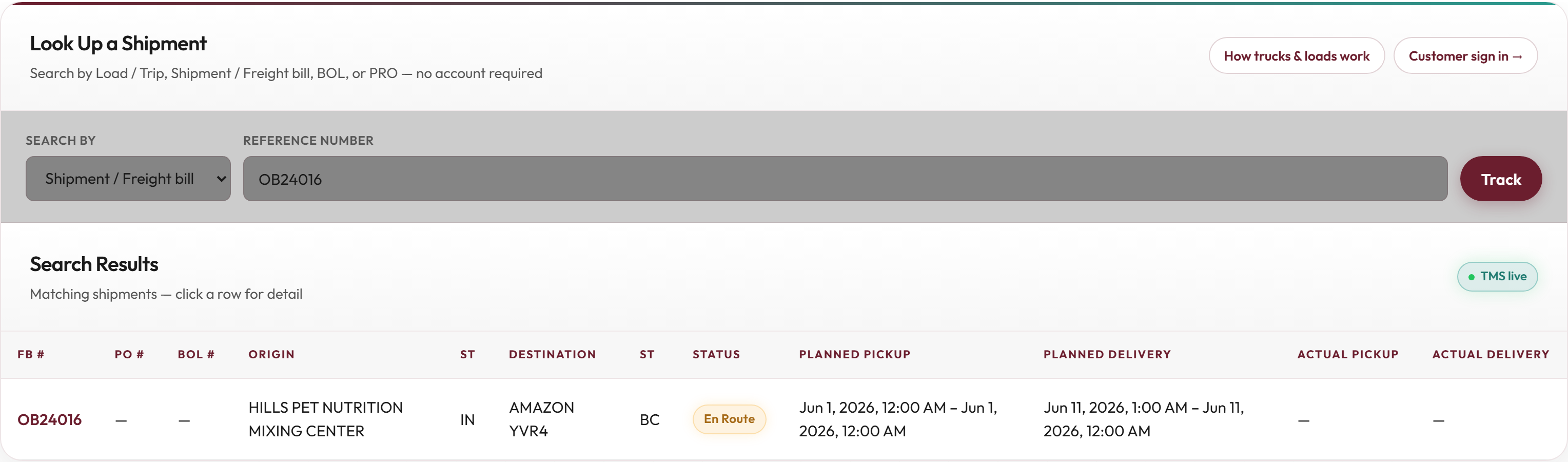
Enter a trace or reference number and view authorized shipment status, location, stops, and delivery progress. Quick, easy, and zero password friction for warehouse clerks and consignees.

  • ✓ Load #, BOL #, Freight Bill #, or PRO # lookup
  • ✓ Current load status & verified location
  • ✓ Pickup & delivery milestone progress
  • ✓ Stop sequences and tracking events
No complicated portal account required.
OPTION 02 Secure Account

Customer Portal

Customers log in to see their active and historical freight in one place. Gives shippers a personalized, authoritative view of their entire freight relationship with your company.

  • ✓ Active, scheduled & delivered shipments
  • ✓ Complete multi-month shipment history
  • ✓ Live corridor tracking map & route breadcrumbs
  • ✓ Filter by lane, date, status, or PO number
"My freight account with this carrier."
SELF-SERVICE Instant AR

Invoices & Documents

Customers retrieve invoices, PODs, BOLs, and related freight paperwork directly, without calling operations or waiting on accounting.

  • ✓ Instant signed Proof of Delivery (POD) PDFs
  • ✓ Original Bill of Lading (BOL) imaging
  • ✓ Historic invoice archive & itemized statements
  • ✓ Direct shipment-to-document correlation
No emails or check calls to accounting.

Customer portal engine

Instant quotes, live maps, documents, and nightly invoicing

Instant freight rate quoting

Authenticated shippers request lane quotes against published tariff matrices and fuel surcharge tables. Sales approves exceptions inside EXSPEEDITE without re-keying into CRM spreadsheets.

  • Lane + equipment + weight break queries
  • Accessorial preview (detention free time, liftgate, hazmat)
  • Quote PDF with expiration timestamp for audit

Live load map visibility

Pipeline renders CheckPoint and ELD breadcrumbs on a customer-safe map layer. Shippers see ETA refreshes without calling dispatch.

  • Stop sequence and milestone timeline
  • Exception banners for late arrival or hold status
  • White-label hostname per tenant (pipeline.{brand}.com)

Electronic BOL & POD retrieval

Customers download signed PODs, imaged BOLs, lumper receipts, and delivery photos correlated to load number from the portal document drawer.

  • PDF download with tamper-evident timestamp
  • Email alert when POD posts after delivery
  • Role-based access per shipper account

Nightly batch invoicing visibility

After EXSPEEDITE touchless billing runs, Pipeline exposes posted invoices, open balances, and itemized accessorial lines for AP teams.

  • Invoice archive with GL reference numbers
  • Statement export for multi-load accounting periods
  • Sync status when QuickBooks Online or Sage Intacct post completes

Option 1 · Quick Trace

Fast Shipment Lookup for Anyone on the Load

When a consignee dock manager or freight clerk simply needs to know when the truck is arriving, they do not need to create a username or remember a password.

They enter any authorized reference number and instantly see:

Current Status Booked, Dispatched, In Transit, Delivered
Current Location Verified GPS location & highway corridor
Delivery Progress Appointment times & estimated arrivals
Stop Activity Origin departure, transit milestones, POD

This eliminates the constant stream of one-off status emails and check calls to your dispatch desk.

Pipeline Quick Trace Interface

Actual TMS capture: Pipeline Quick Trace with milestone timeline and current status.

Option 2 · Full Customer Portal

A Dedicated Freight Portal for Regular Shippers

For high-volume shippers, key accounts, and contract customers who need ongoing visibility across all their lanes, Pipeline delivers a dedicated freight portal.

The customer logs in securely to monitor and manage their entire transportation program:

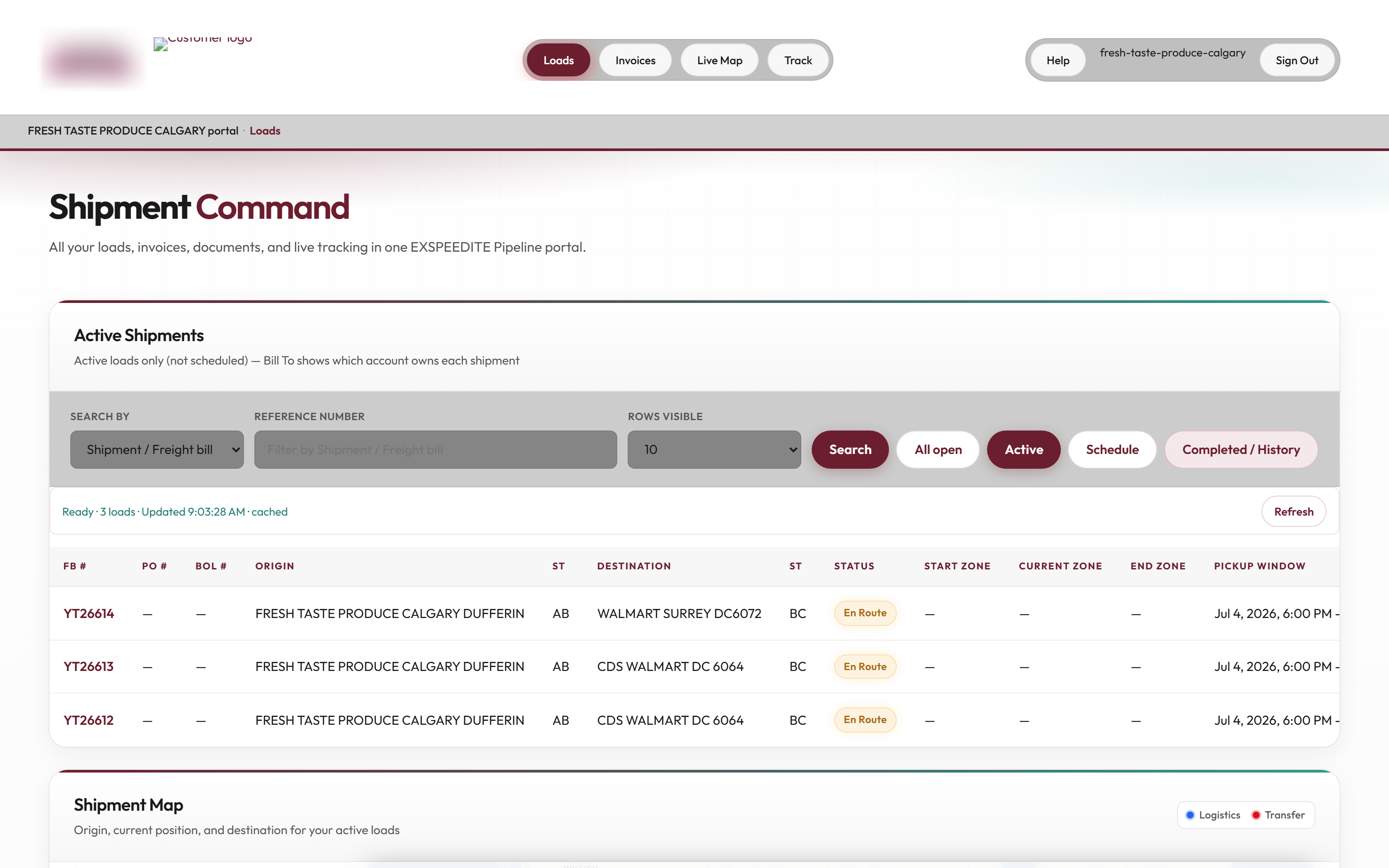
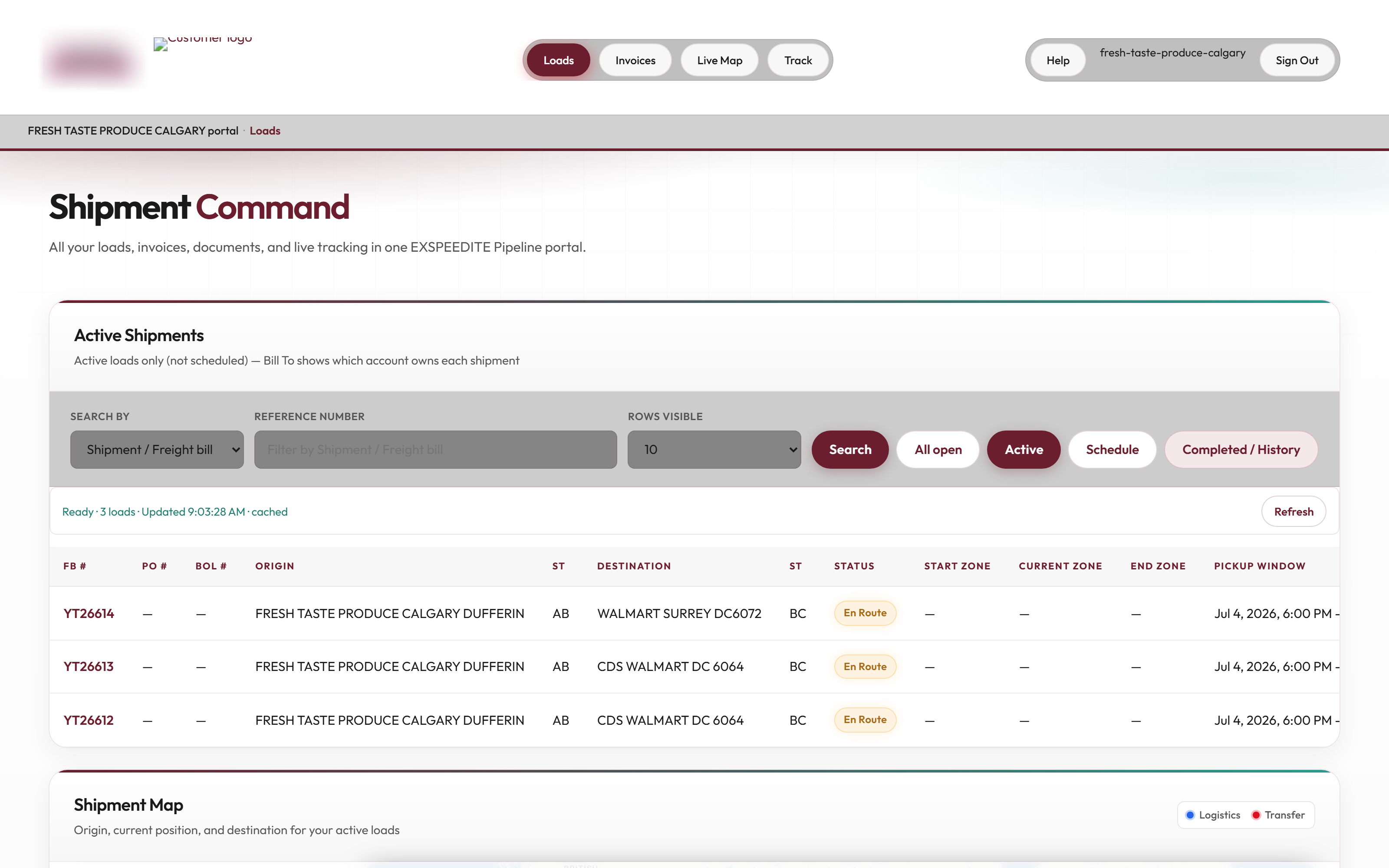
  • Active & Scheduled Shipments: Real-time overview of every load currently planned or on the road.
  • Delivered Shipments & History: Multi-month searchable archive of historical freight activity.
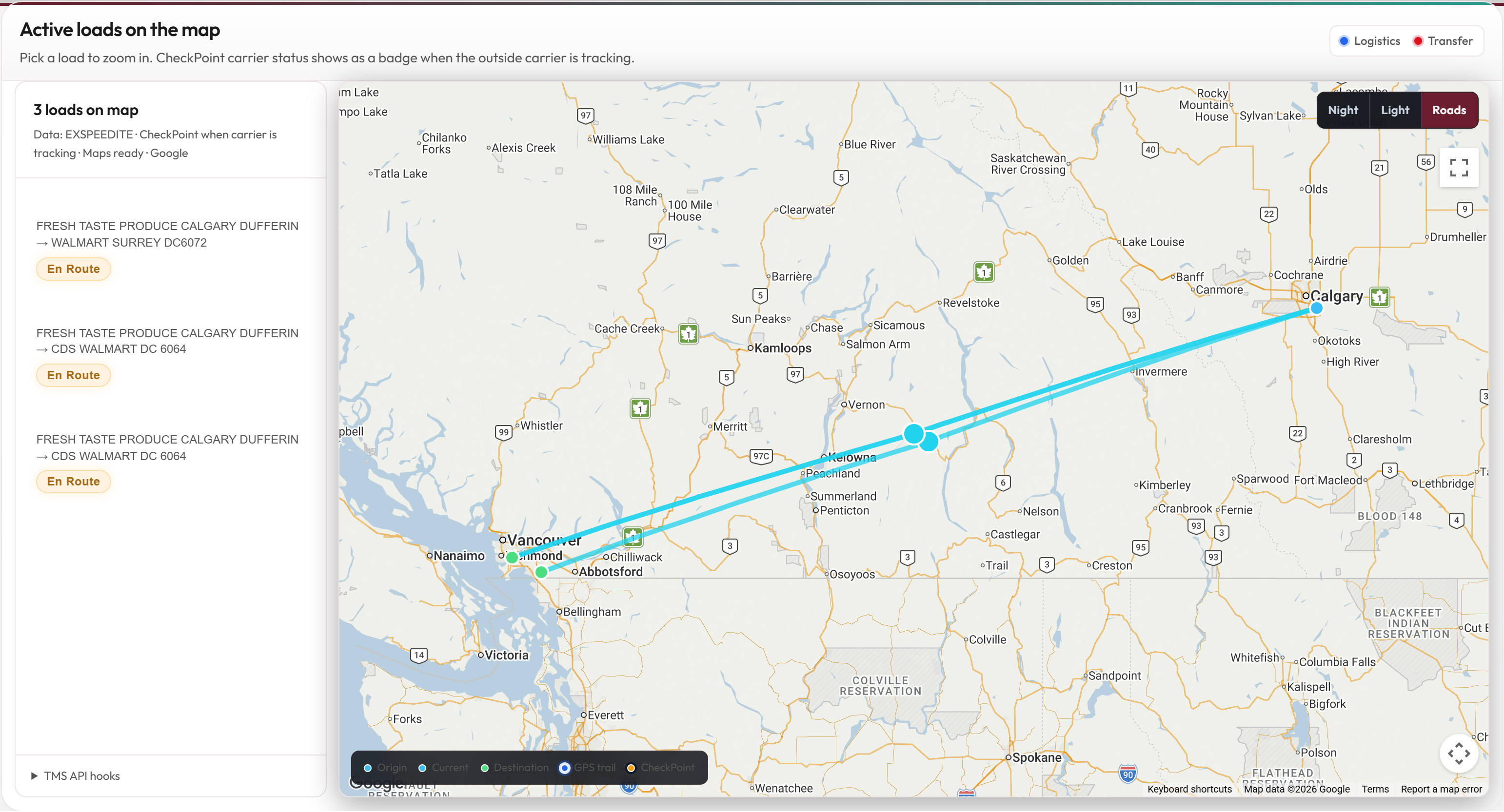
  • Live Corridor Telematics Map: Interactive map showing active truck locations and route progress.
  • Account-Level Security: Customers see only their authorized freight—never another shipper's loads.

The experience feels like: "My freight account with this transportation company."

Pipeline Customer Portal Loads Dashboard
Pipeline Live Fleet Tracking Map

Actual TMS captures: Authenticated loads dashboard & live telematics map.

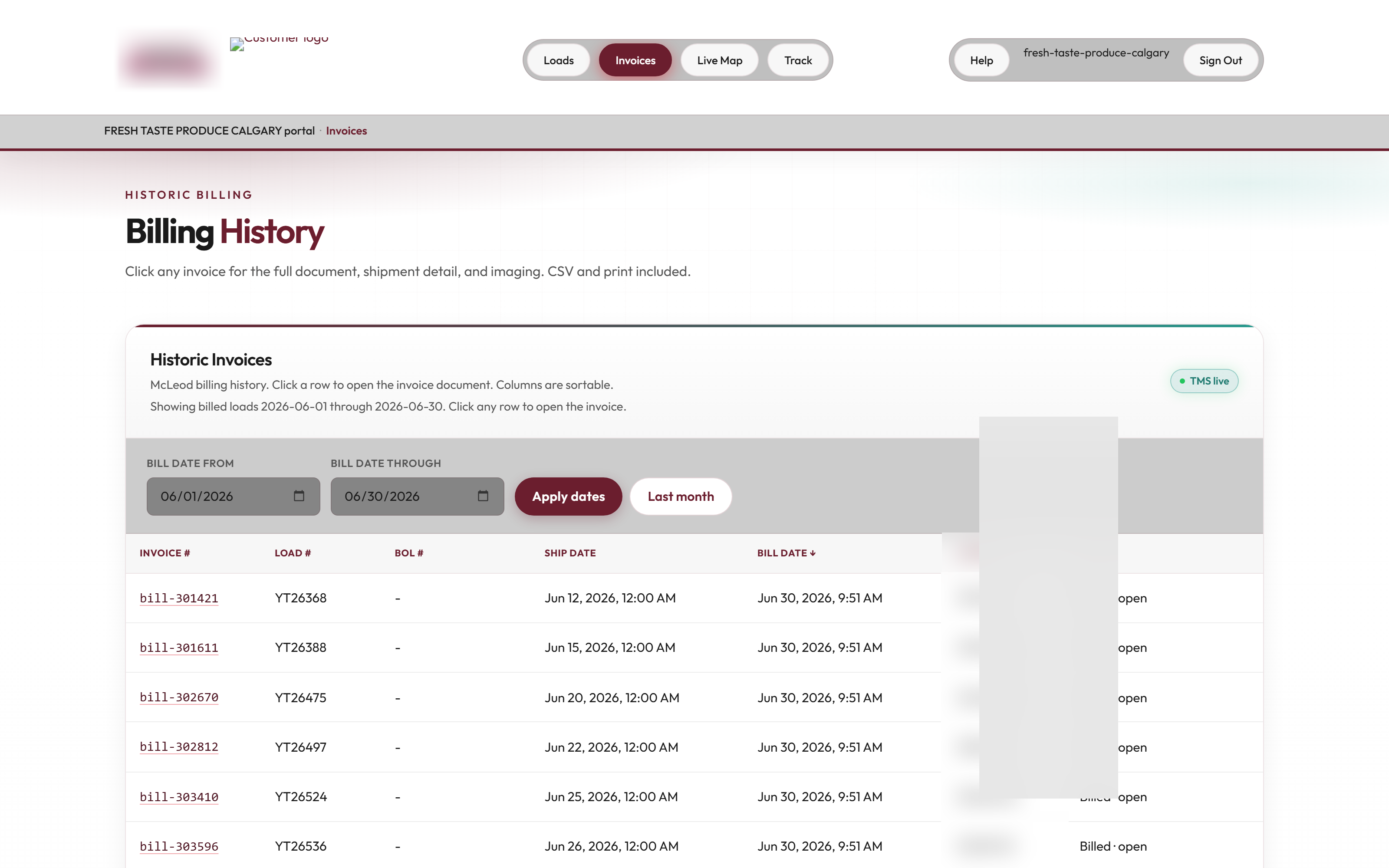
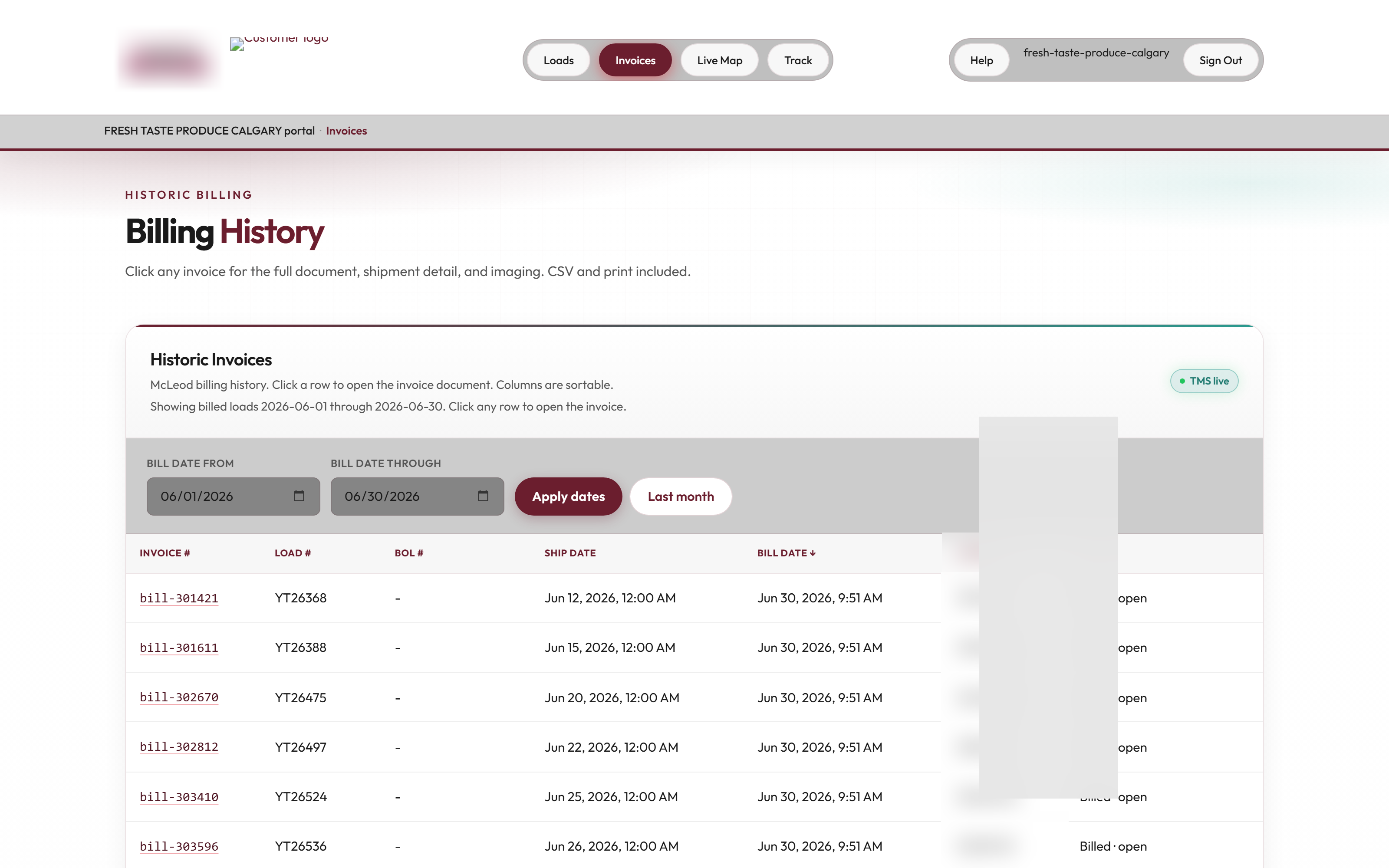
Pipeline Customer Invoices and AR History

Actual capture: Pipeline billing history with direct POD and invoice PDF retrieval.

Billing & Paperwork Self-Service

Customers Can Find Their Own Paperwork Without Calling Accounting

Freight payments stall when a customer's accounts payable clerk is missing an invoice copy or signed Proof of Delivery.

Pipeline puts the paperwork directly into the customer's hands 24/7. Logged-in shippers can review their complete authorized billing history and download documentation in one click:

Invoices & Historical Statements: Review open balances, past invoices, and line-item freight billing charges.
Signed PODs & Bills of Lading: High-resolution delivery receipts and BOLs captured at delivery are immediately available.
Shipment Associated with the Invoice: Every invoice links directly back to its specific shipment details, dates, and stops.

Customers do not need to email customer service simply to retrieve documents that already exist in the TMS.

Strict Enterprise Security Boundary

The Customer Sees What They Need — Not Your Internal Operation

A customer portal should never put your internal operational tools, costs, or other customer data at risk. Pipeline creates an airtight separation between internal operations and customer-facing visibility.

Internal Operations

INTERNAL USERS ONLY

Works Inside: EXSPEEDITE TMS

  • 🔒 Internal dispatch boards & planning screens
  • 🔒 Driver pay, mileage settlements & payroll
  • 🔒 Broker buy rates, carrier costs & margin calculations
  • 🔒 Other customers' shipments & operational records
  • 🔒 Internal dispatch notes & operations logs
  • 🔒 Fleet safety records, IFTA data & maintenance

Customer Experience

CUSTOMER-AUTHORIZED ONLY

Works Inside: PIPELINE

  • ✓ Authorized shipment status & progress
  • ✓ Live GPS location on highway corridors
  • ✓ Pickup & delivery appointment milestones
  • ✓ Customer-facing invoices & billing statements
  • ✓ Signed Proof of Delivery (POD) & BOL documents
  • ✓ Filtered strictly to the customer's own freight

Customers do not need access to internal dispatch screens, rates, other customers, internal notes, or operational controls.

Connected Freight Ecosystem

One Customer View, Regardless of How the Freight Is Being Tracked

Pipeline displays current location and status using the data already flowing into your transportation operation. The customer does not care which underlying system produced the location—Pipeline presents the verified status seamlessly.

The Simple Operational Flow

DRIVER / CARRIER → CHECKPOINT / TELEMATICS → EXSPEEDITE TMS → PIPELINE → CUSTOMER

The Value: Operations does not have to manually tell the customer where the freight is every time they ask.

CheckPoint Tracking

Outside-carrier and brokerage freight tracked via CheckPoint mobile links updates EXSPEEDITE automatically, flowing directly to the customer in Pipeline.

Internal Fleet Dispatch

Asset loads moving on company equipment flow live GPS updates from Samsara, Motive, or Geotab ELDs straight into the customer's corridor map.

Operational Updates

Manual dispatch check calls, geofence arrival triggers, and stop event confirmations immediately reflect on the customer's shipment timeline.

Key Differentiator: Pipeline is not a separate reporting database that needs someone to update it. It is connected to the transportation activity already occurring inside EXSPEEDITE.

Tangible Business Impact

Positioned Around Customer Service Excellence

Deploying Pipeline directly improves operational efficiency and customer retention. When shippers can self-serve, your staff spends time moving freight instead of answering repetitive questions.

Fewer Calls

"Where Is My Load?"

Shippers and consignees check live location and status on demand rather than phoning dispatchers.

Faster Cash

Zero Missing PODs

Customers download their own signed delivery receipts and invoices to approve payments without delay.

24 / 7 Access

Self-Service Service

Provide an enterprise-tier customer experience around the clock without adding night-shift customer service headcount.

Customer-Facing CRM Concept

A Complete Record of the Customer Relationship

The transportation company has a complete record of the customer relationship and freight activity inside EXSPEEDITE. The customer receives a clean, focused portal experience built around their shipments and account.

Brand Identity & Multi-Tenancy

White-Labeled Under Your Domain

Pipeline reinforces your brand in front of your customers. Motor carriers deploy Pipeline under their own subdomain with custom branding and logos.

Manning Transfer

LIVE TENANT

pipeline.manningtransfers.com

Powers dedicated customer portals and public shipment tracking for high-volume manufacturing shippers including nVent and Hoffman Connect.

Dedicated Fleet Portals

WHITE-LABEL READY

pipeline.{your-carrier-domain}.com

Multi-tenant architecture allowing any carrier or brokerage to launch a branded tracking portal under their own domain with zero setup friction.

Software Suite Architecture

Part of the Exspeedite Software Family

Pipeline is built, maintained, and operated by Exspeedite LLC. Strong Tower Consulting, LLC, founded in Minnesota in 2008, is a separately organized sister company under common ownership. It works natively with EXSPEEDITE TMS to provide immediate customer self-service visibility.

Shipper Self-Service Architecture

How does Pipeline give shippers real-time load visibility without exposing your TMS?

Pipeline runs as a tenant-isolated web portal on your own subdomain (pipeline.{tenant}.com) with strict role-based access control. Shippers see only their authorized loads, live ELD or CheckPoint GPS breadcrumbs, and status milestones—never internal dispatch boards, driver pay, carrier buy rates, or other customers' freight.

How do shippers tender loads, download invoices, and retrieve PODs in Pipeline?

Shippers submit new freight orders through the Pipeline web interface or via REST API (/api/pipeline/v1), routing tenders directly into EXSPEEDITE dispatch for rating and assignment. Once delivered, signed PODs, BOLs, and invoice PDFs appear automatically in the customer's billing history for 24/7 self-service download.

  • Reference-Based Lookup: Search by BOL, PO, PRO, or container number without calling dispatch or accounting.
  • Zero-Storage-Waste Document Sharing: Serves compressed, high-resolution BOL/POD PDFs directly from the TMS imaging store.
  • Unified Tracking Feed: Displays consistent pickup, in-transit, and delivery timestamps whether the load ran on an asset ELD or an outside carrier's CheckPoint link.

Frequently Asked Questions

Pipeline Shipper Freight Tracking & Customer Portal

Everything motor carriers and shippers need to know about secure freight tracking and touchless document self-service.

How can a shipper see a load without calling dispatch?

EXSPEEDITE TMS Pipeline, the customer portal from Exspeedite LLC, lets a shipper see tracking, documents, and invoices while dispatch stays inside the TMS. Scott Elliott, transportation systems architect, built Pipeline so customers can look up freight that is already on the operating record.

What is Pipeline?

Pipeline is EXSPEEDITE's customer-facing portal, giving shippers secure access to shipment status, live tracking, historical freight, invoices, PODs and related documents without exposing the internal TMS.

Does Pipeline expose the internal TMS?

No. Internal users work inside EXSPEEDITE, while customers work inside Pipeline. Shippers see only their authorized shipments, documents, and invoices—never internal dispatch boards, driver pay, broker margins, other customers, or operational controls.

Can customers find their own invoices and PODs?

Yes. Logged-in customers can review their billing history, download invoice PDFs, and retrieve signed Proof of Delivery (POD) and Bill of Lading (BOL) paperwork without calling accounting or operations.

Can shippers tender loads electronically through Pipeline?

Yes. Shippers can post new freight tenders directly through their branded Pipeline customer portal or connect via automated REST API (/api/pipeline/v1). Once submitted, orders route directly into EXSPEEDITE dispatch for instant rating and carrier assignment.

Network Capacity

Enterprise Visibility Backed by Real Carrier Fleet Intelligence

Give shippers total confidence in your transport network. Cross-reference available equipment and active power units across Exspeedite's index of 6,830+ profiled commercial motor carriers and 235,700+ active power units.

Explore 6,830+ Fleets →

Customer Visibility Without TMS Exposure

EXSPEEDITE Runs the Freight. Pipeline Lets Your Customer See It.

Give your shippers 24/7 self-service access to live tracking, invoices, and POD documents without giving away your internal operation.

Plan your evaluation

Explore the pipeline customer portal workflow

Choose a checkpoint to shape your walkthrough. This is an evaluation guide, not a live product session or customer performance result.

Find a shipment

Review the shipment lookup and the customer portal loads view.

What to verify: Ask which references a customer can search and which shipments they are authorized to see.

Review visibility

Inspect the customer-facing status and tracking view.

What to verify: Verify which internal dispatch, carrier, and financial information is excluded from the customer view.

Retrieve documents

Review POD and invoice access for the customer account.

What to verify: Confirm the document permissions and the point at which each item is made available.

Inspect the supporting material

Use these existing resources to prepare questions, then verify the configured workflow with your team.

Carrier implementation questions

What should a carrier verify before giving a shipper portal access?

Test shipment ownership, user permissions, searchable references, and document visibility with representative customer accounts. Confirm that one customer cannot retrieve another customer’s freight or internal operating information.

What should we prepare for a Pipeline setup conversation?

Identify the TMS connection, customer-facing domain, shipment references, status needs, and document access rules. The Pipeline support setup path can then be reviewed against those requirements.

Implementation reading for this workflow

Use these technical resources to review the operating requirements behind the software walkthrough.